CIA triad

--Originally published at Computer and Information Security

Confidentiality, integrity and availability is also known as the CIA triad. CIA triad is a model that establishes some principles for information security, it can be seen as an organizer. These three principles are considered as the most importan principles for security. They aren’t the only ones, but they can be seen as the three pillars of security. The following video explains very well these three principles:

Confidentiality

Confidentiality can be defined as a series of rules that are responsible for preventing information from reaching the wrong hands. That is, confidentiality is in charge of the access. This access must be restricted for those that don’t have the authorization to see the information. One way to prevent a leakage is to create levels. Most of the time, information is categorized depending on the impact it would have if the specific information was stolen.

Integrity

Integrity is an important pillar to security, it is in charge of the accuracy, consistency and trustworthiness of the information all the time. It is crucial the security of the data. Information can’t be corrupted or edited by a third-party without the autorizaron. Also, while sending data, it must be delivered and received without any modification in between. Software can be involved in order to check the integrity of data that is traveling  from one place to another.

Availability

Availability is mainly in charge of the hardware. If there are complications between services or any damage, there must be a resource in charge of fixing it. Also, it needs to be updated all the time and there has to be one that establishes de communication between the different services. There must be an adaptive recovery if it is necessary. It is important to have a way out of problems, even without a person in charge for it.

CIAtriad-copy1.png

In Continue reading "CIA triad" →

DNS Spoofing con el WiFi Pineapple

--Originally published at Toledo

¿Qué es el DNS?

Por sus siglas en inglés DNS, Domain Name System, es un sistema en internet que funciona como directorio. Cuando intentas acceder a alguna página, digamos google.com, lo que sucede por abajo del agua es que la computadora va y pregunta la dirección IP en la que se encuentra el servicio de google.com, ir a consultar dicha dirección. La cual en mi caso es 172.217.9.14.

Screen Shot 2018-05-08 at 3.19.34 AM

¿Qué es el DNS Spoofing?

Tambien conocido como DNS Poisoning. Es un tipo de ataque que se aprovecha de las vulnerabilidades de DNS. Con la configuración correcta, quizá un ataque de man-in-the-middle de por medio, es posible personificar servicios conocidos. Puedes direccionar a tu víctima a un servidor de DNS del que tu tengas control, y podrías modificar las direcciones IP de los dominios que consulte.

WiFi Pineapple: DNS Spoofing

Antes que nada es necesario terminar la configuración del WiFi Pineapple. En éste blog doy una breve introducción al WiFi Pineapple y explico cómo setearlo.

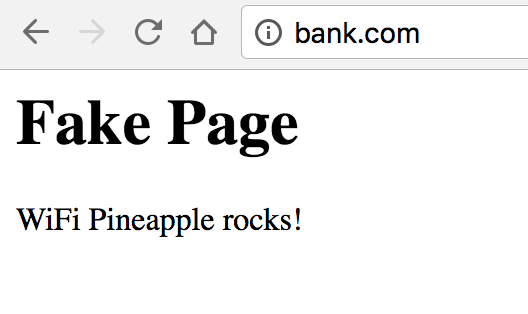
Lo siguiente es tener un sitio de pruebas fake. Como demostración, voy a utilizar el paquete de http.server de python 3 para levantar una paqueña página.

Creamos un archivo llamdo index.html en un directorio nuevo con el contenido:

<head>
<\head>
<body>
 <h1>Fake Page</h1>
 <p>WiFi Pineapple rocks!</p>
<\body>

Con la terminal en dicho directorio. Ejecutamos el servidor con python3:

python3 -m http.server 8080

Con ésto deberíamos poder ver nuestra página si utilizamos nuestro navegador para ir a la dirección http://localhost:8080/

Screen Shot 2018-05-08 at 3.51.12 AM

Consultamos nuestra IP y le guardamos para utilizarla en los siguientes pasos. Tambien podemos acceder a nuestra página a tráves de ella.

Screen Shot 2018-05-08 at 3.54.19 AM.png

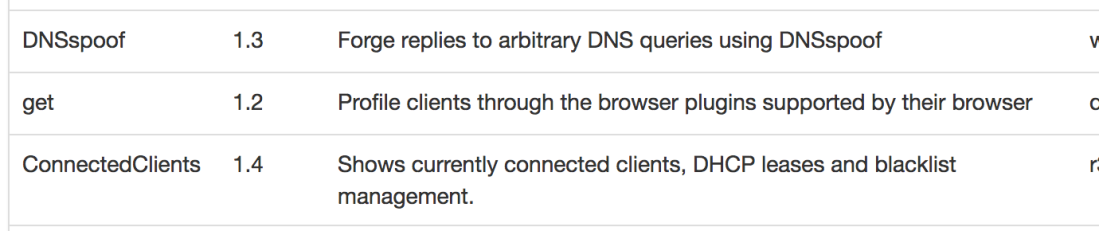
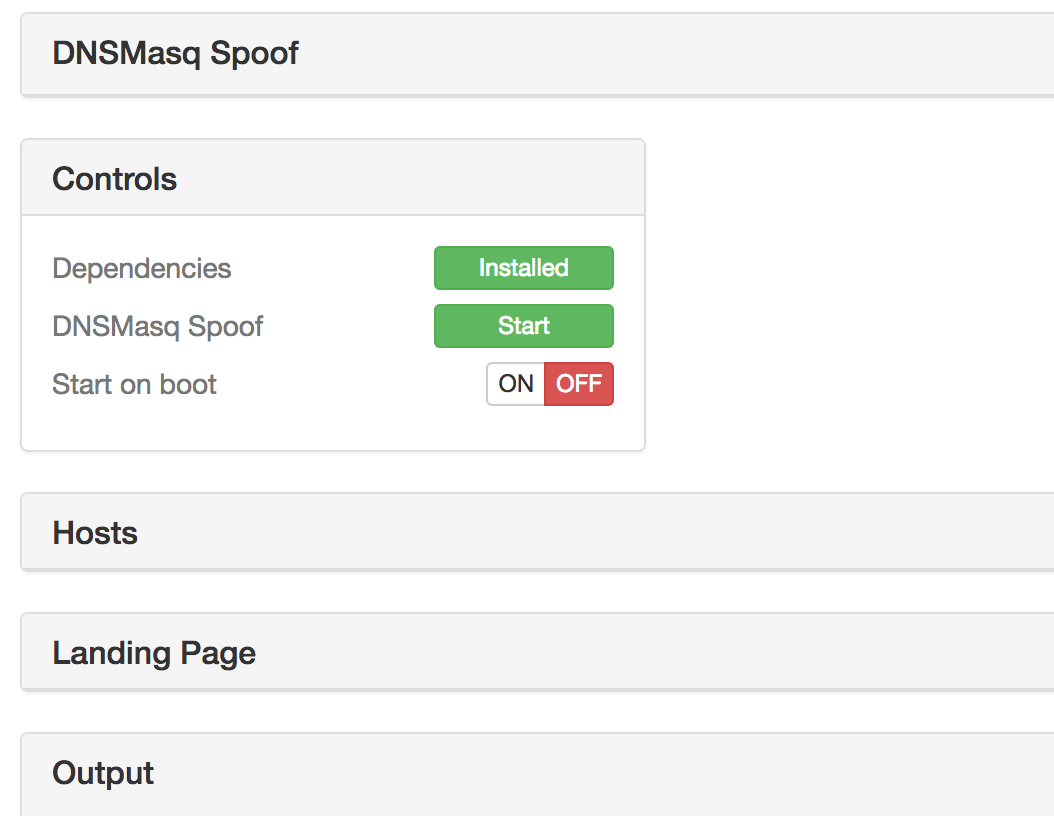
Ingresamos a la interface web del WiFi Pineapple. Por suerte para nosotros, ya hay software desarrollado para el Pineapple para todo tipo de ataques. El DNS Spoofing

Screen Shot 2018-05-08 at 3.56.36 AM
Screen Shot 2018-05-08 at 3.56.45 AM
Screen Shot 2018-05-08 at 3.56.56 AM
Screen Shot 2018-05-08 at 4.18.58 AM
Screen Shot 2018-05-08 at 4.22.20 AM
Screen Shot 2018-05-08 at 4.29.22 AM
Screen Shot 2018-05-08 at 4.27.37 AM
Screen Shot 2018-05-08 at 4.27.24 AM
Screen Shot 2018-05-08 at 4.27.16 AM
Continue reading "DNS Spoofing con el WiFi Pineapple" →

Denial-of-service attacks

--Originally published at Computer and Information Security

Have you ever feel that a webpage is loading too slow compared to other times, a poor network performance while trying to retrieve s file from a cloud server, an increasing amount of time in order to reach an specific service from the internet? It’s obvious that there are many factors that can influence the weak performance from the network, but it is important to take into account that it could be a denial-of-service attack. It’s not that easy to spot the problem, but first, what is a denial-of-service attack?

We can define a a DoS attack as a planned attack to a server in order to disrupt an organization’s network to complicate the entry of their user to their services. The attack can limit the access to the network or even to deny the access. The main point is to prevent any online activity through the servers that are being attacked.

There is also a Distributed Denial-of-Service attack, where the attacker also infects the computers that get connected to the infected servers and now these new computers are used to infect more users. These new infected computers are known as zombies. Zombies are the computers that are controlled by the attacker. With the control of all of the computers, the attacker can use their power to overload the services, such as mail, internet, and network services.

Also, there are three specific categories in which the hackers focus their attacks:

  • Networks
  • Systems
  • Applications

Distributed-Denial-of-Service-Attack-Greets-Forked-Bitcoin-Gold-on-First-Day.jpg

Mainly, all of them create requests to overload the servers until there is no response or until they create an error on the system. One of the main goals is to consume as much bandwidth as possible in order to create slowdowns in networks. Hackers also focus on hardware, such as routers and devices that need network Continue reading "Denial-of-service attacks" →

Redes domésticas

--Originally published at Computer and Information Security

Es muy útil saber cómo modificar los ajustes de un módem. Cambiarle la contraseña a la red de la casa o incluso cambiarle el nombre puede llegar a ser muy sencillo y puede a llegar a incrementar un poco la seguridad de la red. Sin embargo, hay más opciones en los ajustes de un módem y éstas pueden llegar a ser implementadas de una manera muy sencilla. Una de las ventajas de acceder a los ajustes de éste es que puedes crear redes locales dentro de la casa o la oficia. La división de la red puede llegar a ser útil para conectar ciertos dispositivos a una de ellas y los otros a la otra, se puede crear una red para invitados, o incluso redes privadas para intentar mantener más segura cierta información que se comparte cuando alguien se encuentra en la misma red. A continuación, se mostrará un pequeño tutorial para crear una nueva red doméstica.

1 – Entrar a la página web del módem

Normalmente, para poder acceder a la configuración del router se tiene que ingresar a la dirección 192.168.X.X. En este caso para ingresar a la configuración del módem de Telmex, se ingresa a 192.168.1.254. El usuario puede variar (TELMEX en este caso) y la contraseña es la clave que viene en el modem.

1.png

2 – Ir a Red

Al entrar a la configuración del módem, una ventana parecida aparecerá en la pantalla. Hay que seleccionar la opción de “Red” que se encuentra en la columna izquierda.

2.png

3 – Inalámbrico (2.4GHz o 5GHz)

Una vez adentro de la opción de Red, se selecciona el tipo de red inalámbrica que se desea crear el la columna izquierda. En este caso, se seleccionará la red 5GHz.

3.png

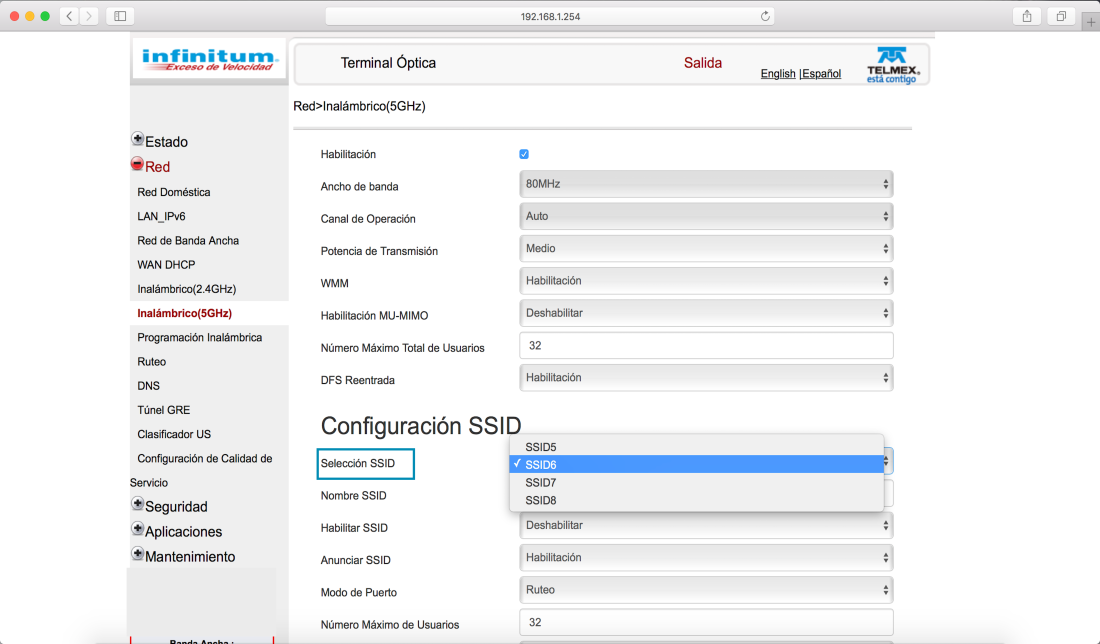
4 – Seleccionar SSID

En

4.png
5.png
6.png
Continue reading "Redes domésticas" →

Privacy? Yes, please

--Originally published at Computer and Information Security

With all the attention that Facebook ir receiving, what are you doing to protect your information? Not just your Facebook’s personal info, but also your internet traffic is somewhere in a server, without even your consent. Facebook isn’t just the only one that retrieves your traffic information, also Google and many other companies, even with a VPN. Nowadays, it is difficult to hide your information from these companies, but there is always a solution, or at least to protect a little more your information.

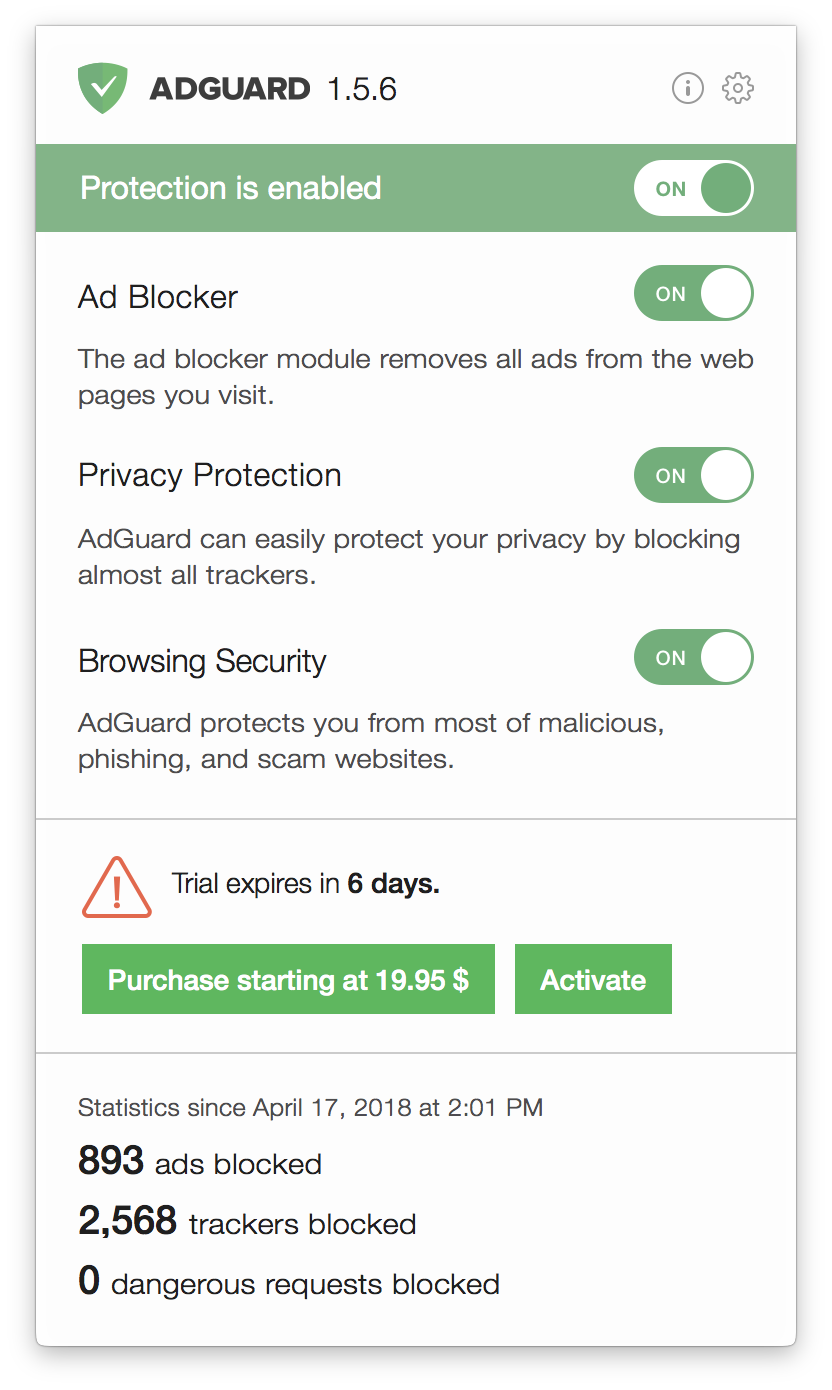
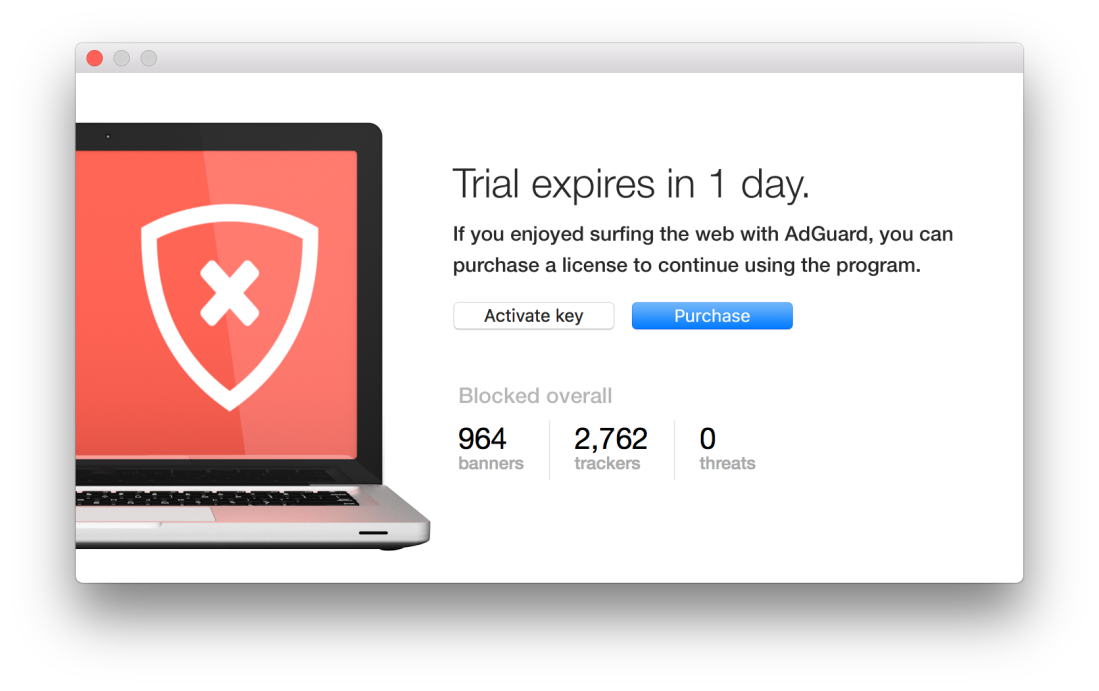
Personally, I do think that ads are necessary when the content is free because it’s work that it given for free. The problem is when the pages that are publishing those ads are also giving your personal info and internet traffic to a third-party company without even saying it to you and that’s the point that isn’t fair or correct. With all of the privacy movement, I just decide to look for an AdBlocker to my MacBook Pro. Not just to hide those invasive ads, but also to protect a little more my information. While making a little research through Reddit, I found a thread asking for some AdBlockers (link: https://www.reddit.com/r/apple/comments/7o7zw9/your_favorite_adblocker_for_safari_macos_with/). Thanks to the comments, I opted for AdGuard. My experience was incredible.

Adguard-Mac.png

AdGuard isn’t my first ad blocker, but it was completely different from the others. Starting with its interface, it is really easy to use. It has interesting options, a menu appears when a page has ads and it gives you options for the page, such as: Block Element, Add Exception, or do not block the page for 30 seconds. For experience, some ad blockers doesn’t work with some pages becase devs are implementing a way to find out when you have an ad blocker, but the cases with AdGuard were

Screen Shot 2018-04-30 at 11.08.12 AM.png
Screen Shot 2018-04-30 at 12.04.19 PM.png
Screen Shot 2018-04-30 at 11.17.13 AM.png
Continue reading "Privacy? Yes, please" →

The end

--Originally published at Let’s talk security. – Rudy&#039;s Corner

The semester is done, my 8th semester studying ISC came to an end and I don’t know how to feel about it, but that is not what this post will be about. I will talk about what I learned throughout the Security course. This won’t be a huge blog post, I’ll just point out a few things that I am taking from this course.

  • Update, the importance of keeping all my devices updated so that I have the latest security.
  • Backup, keep a lot of different backups in case something fails with the computer you won’t lose the data.
  • Layers, it is of great importance to have as many layers of security as possible, so it becomes harder and harder to break into your system.
  • Trust no one (or almost no one), check who your giving permission to see your social media, who sees what and why they see it.
  • Stay up to date, keep checking the new things that come up, the new technologies, the new threats.

And those are the things that I learned more from this course, thanks for reading it has been a great ride!

Bye.

Packet Squirrel

--Originally published at Lord Security

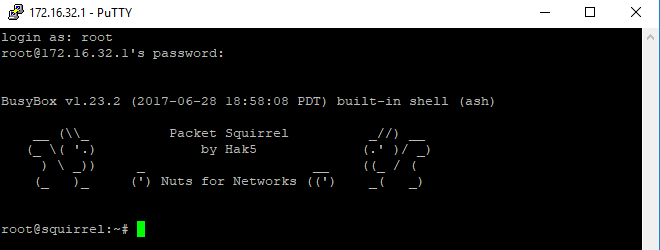
On these days I could get my hands on a really cool device from hak5, the Packet Squirrel, which can be used for an Ethernet man-in-the-middle attack, being able to use it as a sniffer or to get remote access to a network.

Capture.PNG

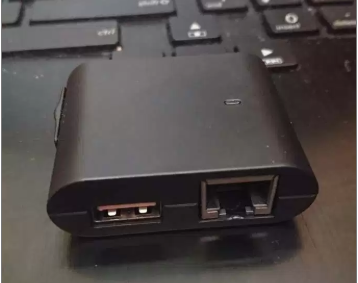
This tiny device has a button to turn it in, an Ethernet in port, an Ethernet out port, a microusb por for power, a usb port for storage and a switch to select which of the payloads to run.

31948633_10156605872783311_5151475695712468992_n.jpg

squirrel

The default payloads the packet squirrel has are:

  • TCP Dump: . It allows the user to display TCP/IP and other packets being transmitted or received over a network
  • DNS Spoof: Alters the DNS directions from the victim to show a different page
  • OpenVPN: Provide remote acces to the network or client tuneling

To use de TCP dump you just need to select the first payload, moving the swithc until the left and connect it to the device you want to see the traffic. Then the led will start to flash yellow indicating it is saving the traffic in the usb flash until you push the button to indicate you are done. Finally plug the usb to you PC to see a pcap file, which you can inspect the traffic with a protocol analyzer, like Wireshark.

dumptrafico

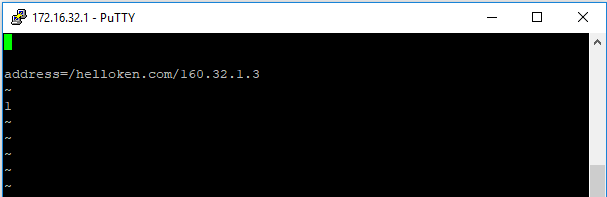
In the case of the DNS spoof you need to enter the arming mode of the packet squirrel (rightmost side), and configure the spoofhost file with the domain and the ip you want to set.

putty

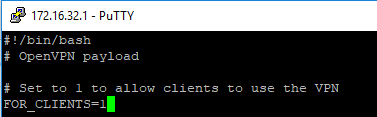
With the OpenVPN you can provide remote access to the network, the target device will have access to the network in the Ethernet out port without interruption, the OpenVPN will be established enabling remote acces to the pcket squirrel

Also it can be used to tunnel the traffic

sjfad
Continue reading "Packet Squirrel" →

Configurando el WiFi Pineapple

--Originally published at Toledo

En éste blog hablaré de cómo configurar y empezar a utilizar el Pineapple. Para éste caso, estaré utilizando la versión Tetra del dispositivo. Y para configurarlo desde cero, estaré utilizando mi celular con Android.

Hack5 tiene documentado en su página los pasos a seguir para configurar el Pineapple. Las instrucciones en éste blog están basadas en dichos videos. Pueden revisar el video en inglés aquí.

Viene con un pequeño manual, con el dispositivo. Éste contiene contenido en inglés de todas las capacidades que tiene el WiFi Pineapple, cubre conceptos básicos relacionado con WiFi y documentación de uso.book_wp

Lo primero para empezar a utilizar el Pineapple es conectarlo y esperar a que la luz acul se quede estable.

20180504_022701

Conectar las antenas es totalmente innecesario, al menos para hacer pruebas locales y jugar con el Pineapple. Pero debemos reconcer que se ve 10 veces más intimidante con ellas puestas.

20180504_022828

Después sigue instalar la applicación de Android para conectarnos al Pineapple utilizando nuestro celular. La applicación se llama WiFi Pineapple Conector. Es necesario que el celular soporte USB Thetering, ésto es una funcionalidad que le permite al celular compartir internet a través de USB.

Conectamos el Pineapple a nuestro celular, y abrimos la aplicación. Vamos a necesitar activar el USB thethering, una ves lo hemos hecho. La app nos va a preguntar si está activado. Simplemente decimos que sí.

El Pineapple de fabrica viene sin los firmwares necesario instalados. En dado caso, va a ser necesario descargarlos desde https://www.wifipineapple.com/downloads/tetra/latest e instalarlos manualmente.

Vamos a ver por primera vez la interface del Pineapple. Simplemente damos clic en Get Started. Nos va a pedir que desactivemos el WiFi desde el Pineapple. Un simple clic al botón que está en la parte trasera del Pineapple hace el truco. Es el único botón que tiene

Screen Shot 2018-05-04 at 2.46.09 AM
Screen Shot 2018-05-04 at 2.46.25 AM
Screen Shot 2018-05-04 at 3.07.25 AM
Screenshot_20180504-030811
Continue reading "Configurando el WiFi Pineapple" →

¿Qué es el WiFi Pineapple?

--Originally published at Toledo

El WiFi Pineapple es un dispositivo desarrollado por Hack5, que actúa como un Access Point, o modem Le permite a quien lo controla monitorear, scannear  o interceptar la comunicación de quienes utilizan la red abierta que el dispositivo genera.

No con la intención de causar daño. La inspiración de su creación es para servir como herramienta de auditoría de seguridad para expertos en el área. Tiene en el mercado alrededor de 10 años, y al momento la empresa ha sacado seis generaciones.

El dispositivo tiene dos modelos principales:

WiFi Pineapple Tetra

tetra

Siendo éste el modelo con la version completa y con todo el poder de un WiFi Pineapple. Según la página web, cuenta con las siguientes especificaciones:

  • PineAP software, con interface web y modulos disponibles
  • (2x) Dual-Band (2.4/5 GHz) 802.11 a/b/g/n radios
  • (4x) Amplificadores Skybridge con 800 mW por radio
  • Puerto USB Ethernet (Realtek RTL8152B chipset)
  • Puerto USB Serial (FTDI D2XX chipset)
  • 533 MHz MIPS 74K Atheros AR9344 SoC
  • 2 GB NAND Flash
  • USB 2.0 Host Port
  • RJ45 Fast Ethernet LAN Port

WiFi Pineapple Nano

nano1_1bb4f835-cdc1-424b-9d4f-3a03863fde71_1024x1024

Es una versión compacta del WiFi Pineapple, su diseño está enfocado en la portabilidad para fácil acceso en cualquier ambiente donde se vaya a utilizar. Con el trade-off de que el poder que tiene disponible es ligeramente menor a la versón Tetra. De acuerdo a Hack5, sus caracteristicas son:

  • PineAP software, con interface web y modulos disponibles
  • 2 antenas 2.4 GHz b/g/n Atheros radios
  • 400 mW por radio
  • Puerto USB Ethernet Plug
  • Capacidad de memoria con Micro SD (hasta 128 GB)
  • EDC Tactical case y bateria opcionales
  • Puerto USB 2.0

Ambos modelos tienen capacidaded para auditoría de seguridad impresionantes. Elegir uno o el otro depende de las necesidades que se tenga en cuanto a portabilidad y poder requerido.

Clean your shoes before entering the house.

--Originally published at Merino is talking about security.

Data sanitization is a simple yet effective tool to preventing attacks. What kind of attacks? you may ask, well many, but all can be summarised as code injection.

In web applications you may encounter with a form, any form, that lets you write whatever string and maybe do something with it, display it as a comment, save it in the data base, send it as message, etc. But lets say that instead of jut plain text, I write a piece of code, and if the input isn't sanitized the page will run that code, and the results can be disastrous. Let the people at computerphile explain it better: 
there are quite some kinds of code injection but here as the most common ones:

SQL injection: As the name indicates, is meant to attack SQL databases, adding sql scripts to the un-sanitized input can result in the database running said queries and returning data that should be read by the user. More info.

Javascript and HTML injection: By adding Javascript and HTML code to un-sanitized inputs can cause the browser to run and make the page behave in unwanted ways, this can potentially affect other users ass well. More info.

A simple solution to this problem is input sanitization, it cleans your inputs so that malicious code can't be written into it. You can do this by preventing certain characters or sets of characters to be typed in your input. Maybe banning the single quote or the <> brackets. The people at eSecurity Planet wrote a very in depth article on how to protect your web applications using code sanitization, there are many things you can do. Since HTML5, input type can be added to any input tag, and that can be a small step into making sure that the incoming Continue reading "Clean your shoes before entering the house." →