Faulty HDD

--Originally published at My TC1017 programming class

So, I have noticed just how many people have damaged Hard Drives, and they don’t know it, thinking it could be because their PC is old, or because they have other software related isssues.

So, seeing how this is a common problom, I will try to speak of my experience on how to detect it, and fix it.

A computer teacher told me, a super fast (and not so reliable) test, is to see how much your disk is working. So, to do this, search for  the Task Manager, then go into Performace. The PC will show real time graphs of the usage of each component of your computer. Close all the apps that you might have running, and look at the Disk chart. If it is NEVER below 50%, you might have damage. I like to wait for a good 10 seconds and see what happens, as well as to take the minimum to be 90%.

Another good way of noticing is checking for noices on your PC. If for some reason you laptop sounds like a 90’s computer when starting up, most likely, you HDD is damaged.

But, the best way of knowing, is running tests on you HDD. In the case of HP and Acer computers, they have programs that can run tests.

I will leave videos on how to do an overall check of your HDD, including the one for HP and Acer laptops.

Tests for HDD

To run a SMART test, open the Command Prompt (Search for it on the search option, or press Windos + R, and type cmd)

Command for SMART Test: wmic diskdrive get status


(All credit goes to the respective owners of each video)


Building your own PC

--Originally published at My TC1017 programming class

So, for many people out there, a computer is something mystical that does magic. For others, it is a machine to do work on. And, for some of us, a computer means ONE thing: Videogames.

Yes, I know, for playing videogames you have consoles alright, but it is not as satisfactory and awesome as playing on a PC you personally built. I started thinking about going full PC Gaming about a year and a half ago, but I did not have the resources nor the knowledge to build one, so I started simple: Watching YouTube videos.

By that time, my Laptop had a faulty HHD (Hard Drive), and was REALLY slow, not to mention the programs crashing from time to time. I thought it would be a good idea to change the HDD to an SSD (Which I TOTALLY recommend), and my teacher helped me out to swap it.

Short after, I saved enough money to buy my PC. By that time, Campus Party happened, so while looking at the Gaming Section, I found several retailers selling the pieces I needed. While loooking, I came across this store that offers the service of bulding your custom PC through their webpage, which is awesome and I used. The good thing, is that it allows you to actually have your PC built or just to buy the stuff for you to build it.

Long story short, I made my custom PC, and now I play on it a lot. So, I will leave all of the links to the videos and webpages that got me trhough this awesome story.

Before continuing, it is important to make sure that your parts will actually go along each other. I will leave a webpages which takes your list, and checks for compatibility issues.

In any

Continue reading "Building your own PC" →

Course Review

--Originally published at Blog Juan Pedro Casian

My Opinion about the course

After a semester working with the flip classroom system created by Ken, I must say that I loved it, usually I was stopped by the class topics because of my previous knowledge in programming topics, but with Ken’s system I could go on and even started learning another programming language which is Java. 

Thank you Ken, I really liked your class because you made us true programmers. I believe that a programmer is not someone who knows all the functions from all the libraries, but a person who can find the solution to all the problems he or she is presented with.

More info here:


WSQ 13

--Originally published at Ernesto's Computing Works

Scilab es un software matemático, con un lenguaje de programación de alto nivel, para uso en cálculo científico, interactivo de libre uso y disponible en múltiples sistemas operativos. Se pueden simular cosas matemáticas y realizar muchos cálculos.

Para este WSQ tenia que descargar una aplicación llamada scilab gratis en este link: http://www.scilab.org/download/latest y luego probarlos y entenderle y saberlo usar, para esto busque tutoriales en internet y ademas abri y le di una murada a un pdf: http://www.scilab.org/content/download/849/7901/file/Scilab_beginners.pdf

Mastery topic 23:

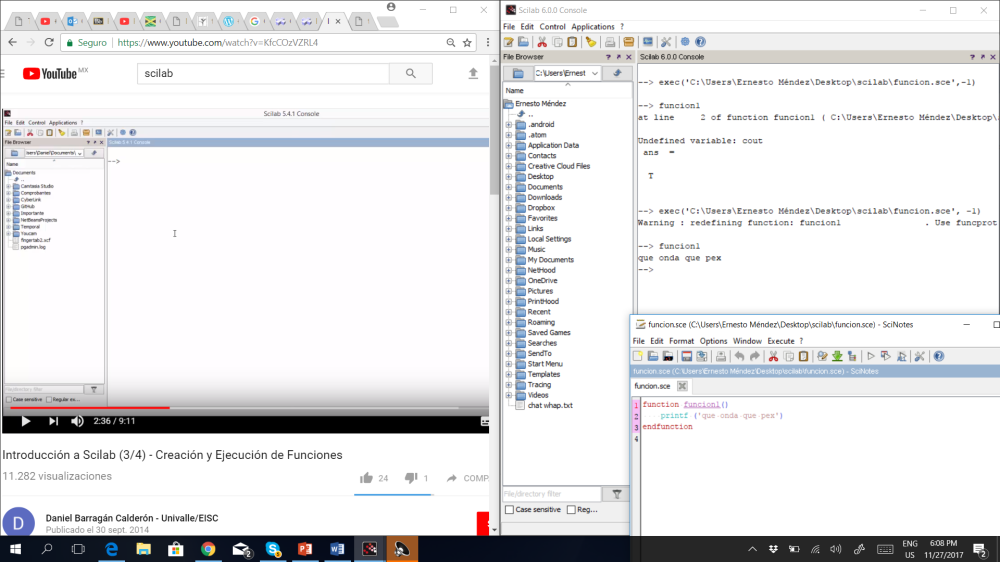
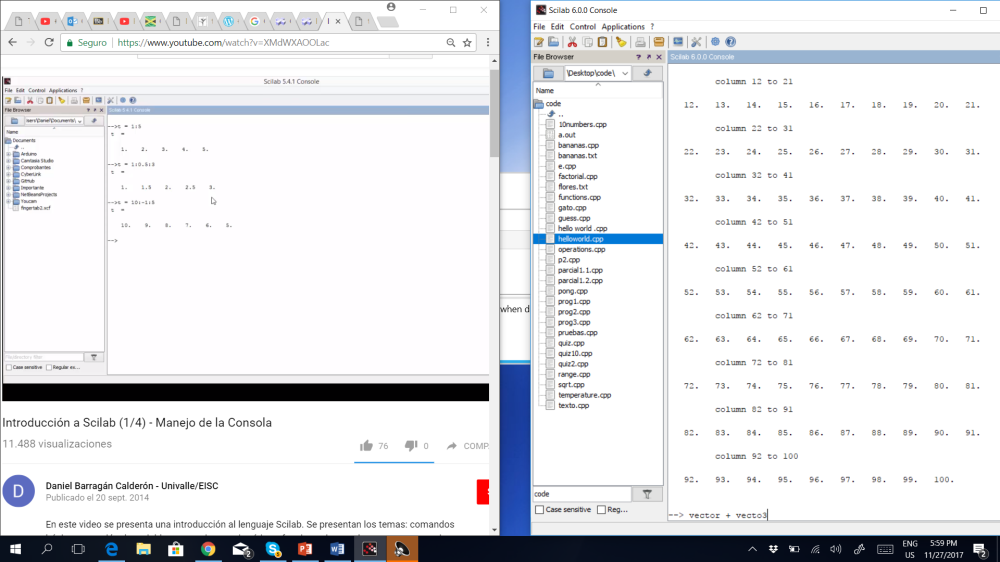
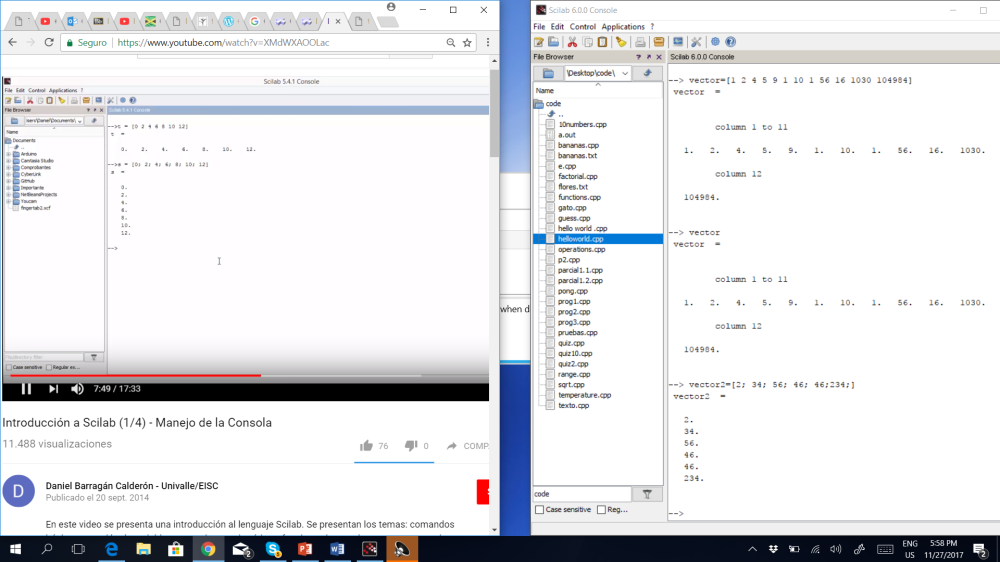
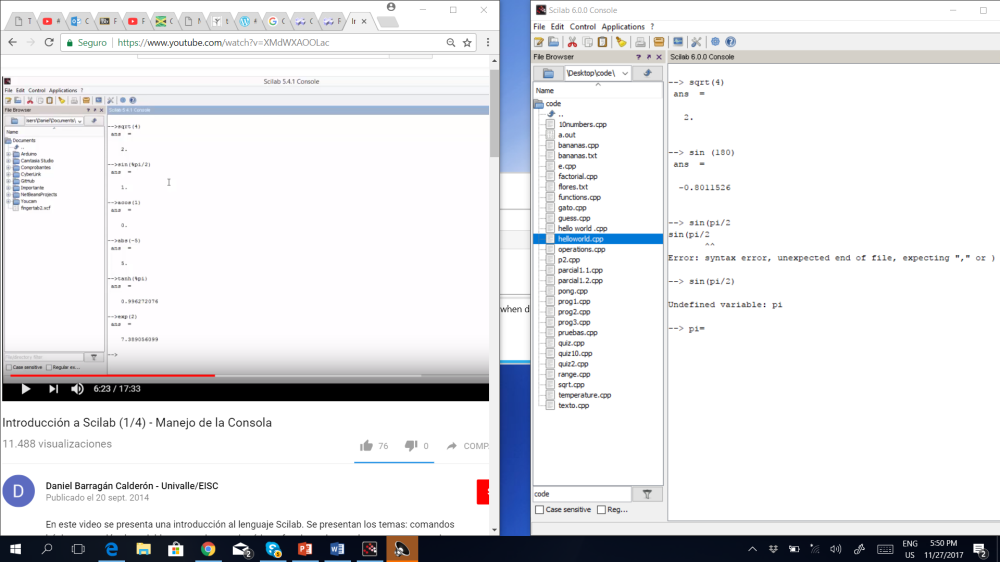
Al inicio no sabia ni para que era esto pero vi los tutoriales y los seguí al pie de la letra, entonces me di cuenta que es simplemente un software mas para programar pero es muy diferente al que comúnmente estaba usando atom con c++. Aprendí lo básico como, declarar variables, usar funciones matemáticas, crear archivos, crear funciones, vectores matrices, es muy diferente a atom, porque aquí ya viene casi todo predeterminado y no es como que ocupes descargar librerías y demás para poder usarlas. De hecho intente usar comandos de c++ pero no me los captaba por ejemplo en c++ se usa cout o printf y aqui solo se podia usar printf.

Aquí les dejo un par de imágenes del o que hice,

Screenshot 2017-11-27 18.08.54Screenshot 2017-11-27 17.59.48Screenshot 2017-11-27 17.58.23Screenshot 2017-11-27 17.50.23

EL link de tutoriales fue: https://www.youtube.com/watch?v=KfcCOzVZRL4 y lo siguiente videos.

Estos son unos de los muchas funciones que tiene:

Analysis
• sqrt(x) returns the square root of x with x real positive or zero, and the complex
root of real positive part otherwise.
• log(x) returns the natural logarithm of x with x real or complex number.
• exp(x) returns the exponential of x with x real or complex number.
• abs(x) returns the absolute value of x real (or the module if x is complex).
• int(x)

Resultado de imagen para linux
Continue reading "WSQ 13" →

Course Review with ken

--Originally published at Ernesto's Computing Works

“Este es una publicación dedicada a mi experiencia que tuve en ken courses”

Este fue un curso fuera de lo común, nunca había llevado este sistema antes, al inicio me saque de onda, porque el dijo, no habrá exámenes, ustedes se calificaran y harás lo que estés dispuesto a trabajar, no hay obligación, entonces me preocupe porque no sabia como me calificaría, y pues las primeras clases no entendia que es lo que haríamos el resto de semestres. Entonces dijo que habría una rubrica la cual nosotros calificaríamos, había trabajos que estaban ahí para programar, y no sabia absolutamente nada de programación por lo que se me dificulto al inicio iniciar.

Pero empece a entender el sistema de enseñanza de Ken y el decía siempre que puede buscarlo cuando quieras haciendo cita o en clase, para preguntarle dudas y cosas que no entendieras, siempre estaba a tu disposición, y la verdad me gusto mucho el curso porque fui aprendiendo poco a poco por mi cuenta y con la ayuda de el profesor, Internet y otro compañeros, el primer parcial se me hizo fácil pero después llego el segundo, y me di cuenta que los programas estaba a un nivel mas alto, ahí fue cuando leí partes del libro como tal.

Por ultimo realizamos un proyecto final en parejas, yo y Jaime hicimos un juego cada uno, el proyecto final esta en otra publicación, Ken dijo que lo hiciéramos de lo que quisiéramos con tal que aprendiéramos. Esa era la filosofía de la clase, las calificacion y entrega de trabajos no son lo que realmente importa, si no que aprendas y vayas a tu ritmo.

Realice 2 videos sobre esto que subí a youtube porque no los podía poner directo al blog, por lo que les dejare el link acá abajo,

Continue reading "Course Review with ken" →

Final Review

--Originally published at Programming in C++

Para la reseña final del curso realice un video en español sobre mis opiniones durante el semestre.

En primer lugar me gustó la forma de restarle importancia al examen y a las calificaciones, puesto que realmente una calificación no demuestra cuanto aprendiste. Al inicio escuche muchos comentarios sobre esto, la mayoría diciendo que no era buena idea y que nadie iba a hacer nada, cosa que no ocurrió. Ya apara el final, escuche también comentarios como “yo creía que no iban a aprender nada”, cosa que, al menos en mi caso, tampoco ocurrió.

Después están las visitas con Ken. Me parece que, al menos en México, no es muy común incentivar a tus alumnos a visitarte en tu oficina. A lo largo del semestre solo visité a dos maestros, uno de ellos siendo Ken y el otro mi director de carrera; de los demás maestro ni siquiera sabia donde quedaban sus oficinas por si tenia alguna duda. Creo que es importante crear esta confianza entre profesor-alumno para el proceso de resolver dudas, ya que muchos estudiantes no preguntan por miedo.

Por ultimo esta el ritmo del curso, cada quien podía llevar el ritmo que quisiese; podías hacer todo el curso durante el primer mes, o hacerlo todo al final (lo cual no recomiendo). Para mi esto fue muy cómodo, puesto que ya había llevado programación antes y entendía algunos temas. Pero si me toco ver muchos casos en los que si batallaban y me imagino que fue porque no habían llevado programación antes ni una clase con dinámica similar.

Al final me gusto el curso, creo que aprendí, pero de una manera más tranquila y relajada, a mi propio ritmo. desde el inicio mi mayor reto no era hacer los programas, puesto que me gusta hacerlos y es entretenido, si

Continue reading "Final Review" →

Proyecto Final

--Originally published at Clase de Programación

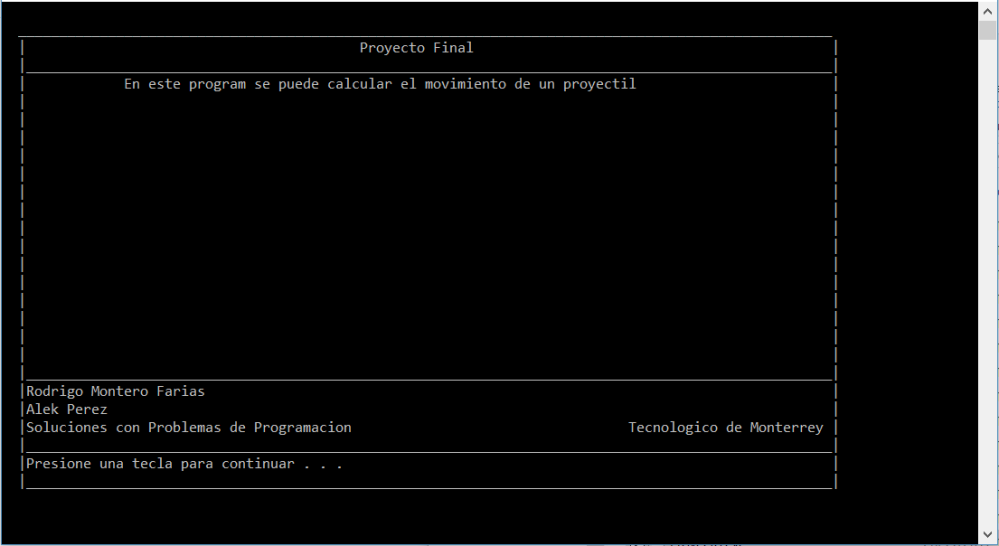
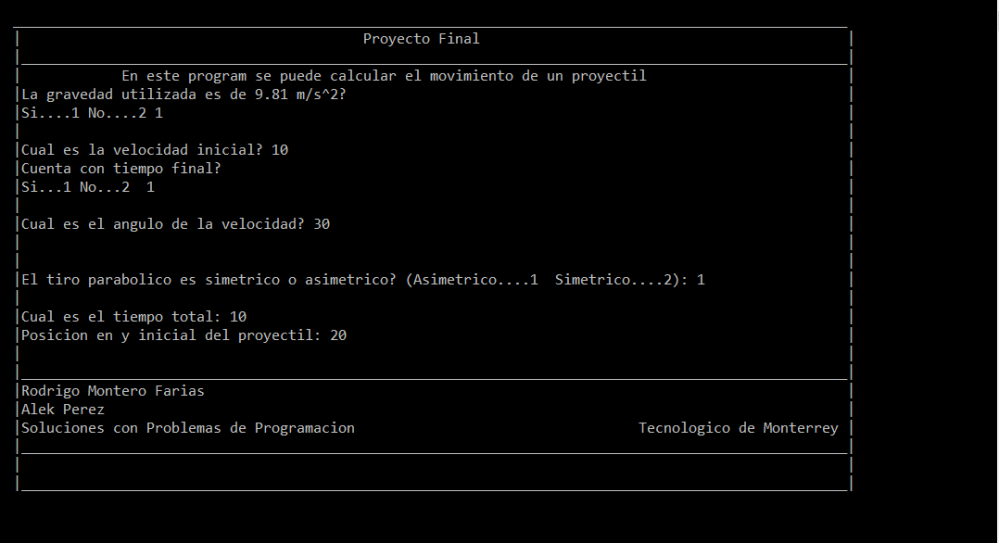
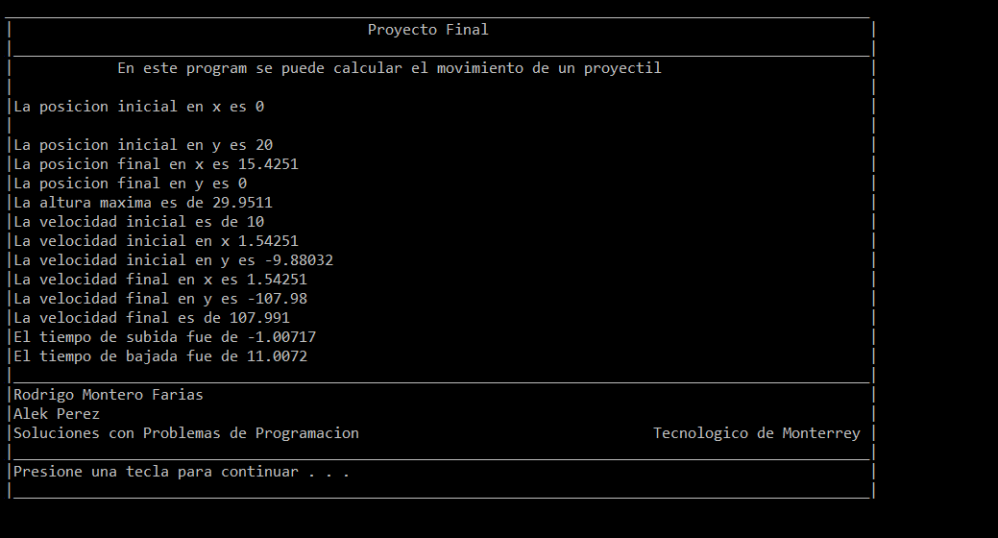
En este proyecto de soluciones con problemas de programación mi compañero Alek y yo nos dimos la tarea de crear un programa que nos pueda calcular el tiro parabólico a través de los modelos MRU y MRUA. Pero este tipo de problemas físicos se pueden resolver de distintas maneras así que contemplamos todos los posibles casos si existe una velocidad inicial.

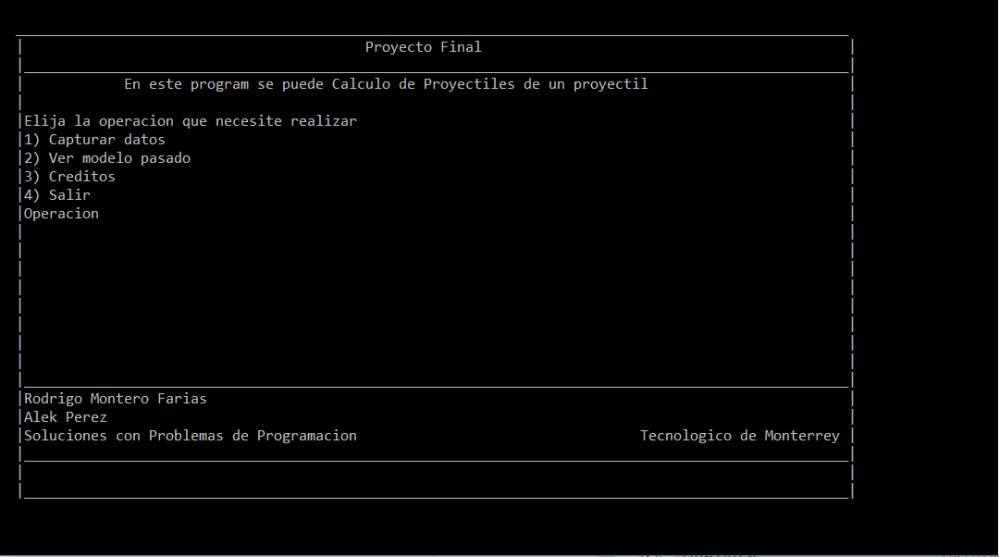
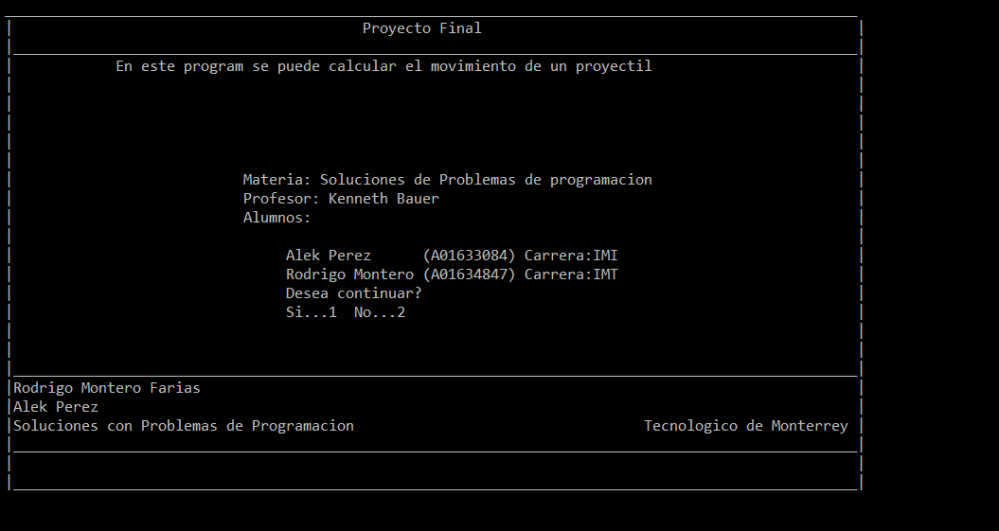
También incluimos al programa un menú principal que contiene cuatro entradas las cuales son: Captura de datos, ver los resultados del cálculo anterior, los créditos de nuestro trabajo y la opción de salida.

Este programa contiene librerías hechas por nosotros y fue realizado a través del compilador dev C++ para facilitar algunas funciones que necesitábamos

Este es el código principal:

#include <iostream>
#include <conio.h>
#include <windows.h>
#include <math.h>
#include “..\\Proyecto\\Gotoxy.h”
#include “..\\Proyecto\\Cuadro principal.h”
#include “..\\Proyecto\\Cuadro_principal_2.h”
#include “..\\Proyecto\\creditos.h”
#include “..\\Proyecto\\despedida.h”
#include “..\\Proyecto\\Opciones_principales.h”

using namespace std;
int main ()
{

cuadro ();
gotoxy (3,25);
system (“pause”);
menu_principal_opciones ();
}

Librerías:

void gotoxy (int x, int y)
{
HANDLE hcon ;
hcon=GetStdHandle (STD_OUTPUT_HANDLE);
COORD dwPos;
dwPos.X=x;
dwPos.Y=y;
SetConsoleCursorPosition (hcon,dwPos);
}

void cuadro ()
{
using namespace std;
for (int x=2;x<102;x++)
{
system (“color 00”);
gotoxy (x,1);
cout<<“_”;
gotoxy (x,3);
cout<<“_”;
gotoxy (x,20);
cout<<“_”;
gotoxy (x,24);
cout<<“_”;
gotoxy (x,26);
cout<<“_”;
}
for (int y=2;y<27;y++)
{
system (“color 00”);
gotoxy (2,y);
cout<<“|”;
gotoxy (102,y);
cout<<“|”;
}
gotoxy (44,2);
system (“color 00”);
cout<<“Proyecto Final”;
gotoxy (15,4);
cout<<“En este program se puede calcular el movimiento de un proyectil”;
gotoxy (3,21);
cout<<“Rodrigo Montero Farias”;
gotoxy (3,22);
cout<<“Alek Perez”;
gotoxy (77,23);
cout<<“Tecnologico de Monterrey”;
gotoxy (3,23);
cout<<“Soluciones con Problemas de Programacion”;
}

void cuadro_2 ()
{
using namespace std;
for (int x=2;x<102;x++)
{
gotoxy (x,1);
cout<<“_”;
gotoxy (x,3);
cout<<“_”;
gotoxy (x,20);

Captura
Captura1
Captura2
Captura3
Captura4
Continue reading "Proyecto Final" →

Décimo Segundo Programa

--Originally published at Clase de Programación

#WSQ12

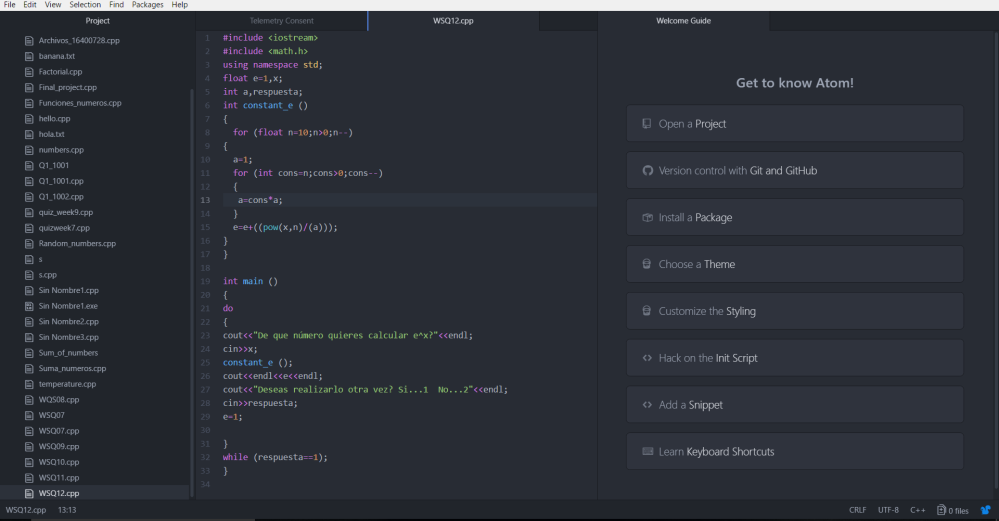
En este programa vimos como crear una función para el cálculo de e^x en donde se le pregunta al usuario con qué número le gustaría elevar e para calcular dicha constante.

En este programa utilicé dos bucles for para que uno calculara el factorial y el otro las potencias.

Código del programa:

#include <iostream>
#include <math.h>
using namespace std;
float e=1,x;
int a,respuesta;
int constant_e ()
{
for (float n=10;n>0;n–)
{
a=1;
for (int cons=n;cons>0;cons–)
{
a=cons*a;
}
e=e+((pow(x,n)/(a)));
}
}

int main ()
{
do
{
cout<<“De que número quieres calcular e^x?”<<endl;
cin>>x;
constant_e ();
cout<<endl<<e<<endl;
cout<<“Deseas realizarlo otra vez? Si…1 No…2″<<endl;
cin>>respuesta;
e=1;

}
while (respuesta==1);
}

Referencias:

http://iboenweb.com/ibo/docs/Demostracion%20de%20Formula%20de%20Euler.htm

WSQ12 CódigoWSQ12 Programa