Hello this is #Mastery17 that talks about using switch as a conditional. A switch sentence makes a variable to be tested to be equal against some values. Every value is named a case and the value is checked for every case.
The structure of a switch is…
Switch (the expression)
Case and constant expression: statement
[default : statement ]
When you make a switch statement make sure you are aware of:
– It is easier for the switch expression to work if it is an integer or an enumerated type.
– The number of cases is unlimited, each one has to be separated with the value they are compared to with a : .
– The constant and the expression compared have to be the same type.
– When a variable is equal to a case, the statements net to that case will execute until a break statement appears.
– A break the switch ends and the control jumps to the following line of the switch.
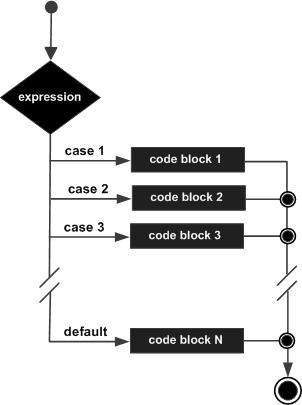
I found this diagram on http://www.tutorialspoint.com/cplusplus/images/cpp_switch_statement.jpg that may explain better this process.
The behavior of a switch statement goes like this:
If s converted value matches the expression – Control is transferred to a statement following the label.
If none of the constants match the ones on the case – Control is transferred to a default label.
96
Normal
0
21
false
false
false
ES-TRAD
X-NONE
X-NONE
/* Style Definitions */
table.MsoNormalTable
{mso-style-name:”Tabla normal”;
mso-tstyle-rowband-size:0;
mso-tstyle-colband-size:0;
mso-style-noshow:yes;
mso-style-priority:99;
mso-style-parent:””;
mso-padding-alt:0cm 5.4pt 0cm 5.4pt;
mso-para-margin:0cm;
mso-para-margin-bottom:.0001pt;
mso-pagination:widow-orphan;
font-size:12.0pt;
font-family:Calibri;
mso-ascii-font-family:Calibri;
mso-ascii-theme-font:minor-latin;
mso-hansi-font-family:Calibri;
mso-hansi-theme-font:minor-latin;
mso-fareast-language:EN-US;}
If none of the constants match the constants in the case labels – Control is transferred to the statement after the switch statement.
I created this simple program as an example for the usage of a switch conditional. It evaluates the number introduced and says if you are an adult or not.