
Tag Archives: #333333

#mastery21 #TC1017

21 1017


Use of recursion for repetitive algorithms

What is recursion? The simple answer is, it’s when a function calls itself. But how does this happen? Why would this happen, and what are its uses?


When we talk about recursion, we are really talking about creating a loop.
Let’s start by looking at a basic loop.


For those who don’t yet know, this basic loop displays the sentence, “The number is: ” followed by the value of ‘i’. Like this.


Inside the ‘for loop’ declaration we have the integer variable ‘i’ and have its starting value of 0. So the first time the sentence is displayed it reads, “The number is: 0”. The part of the ‘for loop’ declaration that is ‘i++’ tells the program that each time the loop repeats, the value of ‘i’ should be increased by 1. So, the next time the sentence is displayed it reads, “The number is: 1”.
This cycle will continue to repeat for as long as the value of ‘i’ is less than 10. The last sentence displayed would read, “The number is: 9”. As you can see the basic ‘for loop’ has three parts to its declaration, a starting value, what must remain true in order to continue repeating, and a modifying expression. Everything that is contained within the {braces} is what the program performs. Cout stands for console out, and prints words or characters to the screen.
So what does this have to do with recursion? Remember recursion is a loop. What if I did not want to just print a message to the screen? A loop can be used to perform other tasks as well.

In the following code is the same loop as above only now it is being used to call a function.

Edit & Run

I have declared a void function, which means it returns nothing, and takes a parameter of ‘int i’. The function is named ‘numberFunction’ and as you can see, all it does is display the sentence, “The number is: ” followed by the current value of ‘i’. The function is called into use by the ‘for loop’, which continually calls the function as long as the value of ‘i’ is less than 10.

Now with recursion, we won’t need to use a ‘for loop’ because we will set it up so that our function calls itself. Let’s recreate this same program one more time, only this time we will do it without a ‘for loop’. We will use a recursion loop instead, like this.

Edit & Run


We did it! We used recursion! You can see the call to ‘numberFunction’ is made only once in the main part of the program but it keeps getting called again and again from within the function itself, for as long as ‘i’ is less than 10.
#mastery26 #TC1017


28 1017


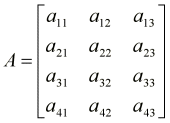
A matrix is, by definition, a rectangular array of numeric or algebraic quantities which are subject to mathematical operations. Matrices can be defined in terms of their dimensions (number of rows and columns). Let us take a look at a matrix with 4 rows and 3 columns (we denote it as a 4×3 matrix and call it A):

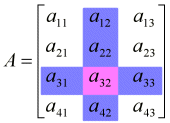
Each individual item in a matrix is called a cell, and can be denoted by the particular row and column it resides in. For instance, in matrix A, element a32 can be found where the 3rd row and the 2nd column intersect.


Matrices are used to represent complicated or time-consuming mathematical operations. A single matrix can hold an infinite number of calculations, which can then be applied to a number, vector, or another matrix. There are several operations that can be done on matrices, including addition, multiplication and inverse calculation; some of which will be discussed shortly. Operations done on one matrix can be transferred to another matrix simply by concatenating the two (by matrix multiplication). Matrices often find their use in 3 dimensional applications, were numerous identical operations are performed on thousands of vectors 30 or 40 times a second. Combining all these operations in one single matrix significantly improves the speed and functionality of a 3D rendering pipeline. Matrices are also used in financial processes (again, where a large number of data has to be processed in a similar fashion).

Mastery09:: Basic types and their use in c++

VARIABLES

Existen varios tipos de variables, y cada uno corresponde a un tamaño máximo de un número, un carácter o incluso una verdad. Cuanto mayor sea el número que pueda admitir, mas espacio en memoria ocupará.

TIPOS DE VALORES 

Existen varios tipos de variables, y cada uno corresponde a un tamaño máximo de un número, un carácter o incluso una verdad. Cuanto mayor sea el número que pueda admitir, mas espacio en memoria ocupará. 

**Bool:  1 byte de memoria, valores: true o false. 

**Char:  1 byte de memoria, permite almacenar un carácter, valores; 256 caracteres. 

**Int: 4 bytes de memoria, valores: de -2 147 483 648 a 2 147 483 647. 

**Double: 8 bytes de memoria, valores: de 2.2e-308 a 3.4e-38. 

**Float: 4 bytes de memoria, valores: de 1.2e-308 a 3.4e-38. 

**String: permite almacenar cadena de caracteres


DECLARACION Y ASIGNACION
Para declarar una variable, basta con indicar su tipo y su nombre. Existen ciertas convenciones en cuanto al nombre de las variables. Algunos prefieren separar las partes de un nombre con ‘_’, otros prefieren escribir una mayúscula para separarlas. Ejemplo: 
int primerNumero;
int primer_numero
ASIGNA UN VALOR 
Es posible asignar un valor a una variable al momento de declararla: 
int numero =  20; 
También es posible declarar varias variables en una misma línea, pero en este caso, todas las variables de la línea tendrán el mismo tipo. 
int numero_uno = 23, numero_dos = 45;

09

1017

#mastery28 #TC1017


28 1017

Reading and writing of files in C++

So far, we have been using the iostream standard library, which provides cin and coutmethods for reading from standard input and writing to standard output respectively.

This tutorial will teach you how to read and write from a file. This requires another standard C++ library called fstream, which defines three new data types:

Data Type

Description

ofstream

This data type represents the output file stream and is used to create files and to write information to files.

ifstream

This data type represents the input file stream and is used to read information from files.

fstream

This data type represents the file stream generally, and has the capabilities of both ofstream and ifstream which means it can create files, write information to files, and read information from files.

To perform file processing in C++, header files and must be included in your C++ source file.

Opening a File:

A file must be opened before you can read from it or write to it. Either the ofstream orfstream object may be used to open a file for writing and ifstream object is used to open a file for reading purpose only.

Following is the standard syntax for open() function, which is a member of fstream, ifstream, and ofstream objects.

Here, the first argument specifies the name and location of the file to be opened and the second argument of the open() member function defines the mode in which the file should be opened.

Mode Flag

Description

ios::app

Append mode. All output to that file to be appended to the end.

ios::ate

Open a file for output and move the read/write control to the end of the file.

ios::in

Open a file for reading.

ios::out

Open a file for writing.

ios::trunc

If the file already exists, its contents will be truncated before opening the file.

You can combine two or more of these values by ORing them together. For example if you want to open a file in write mode and want to truncate it in case it already exists, following will be the syntax:

Similar way, you can open a file for reading and writing purpose as follows:

Closing a File

When a C++ program terminates it automatically closes flushes all the streams, release all the allocated memory and close all the opened files. But it is always a good practice that a programmer should close all the opened files before program termination.

Following is the standard syntax for close() function, which is a member of fstream, ifstream, and ofstream objects.

Writing to a File:

While doing C++ programming, you write information to a file from your program using the stream insertion operator (

Reading from a File:

You read information from a file into your program using the stream extraction operator (>>) just as you use that operator to input information from the keyboard. The only difference is that you use an ifstream or fstream object instead of the cin object.


#mastery27 #TC1017

27 1017

Validated user input in C++

Inputs have to be validated before allowing any kind of processing or operations to be performed on it. This is extremely important because , an unhandled wrong input  might have the complete ability to crash a system.  C++ has some  good  validation techniques that  can be used to validate most kind of inputs. This post  discusses some of the techniques and its shortcomings and  what could be done to improve the quality of validation.

Now, consider a program has to accept only integer inputs and reject all the others. So, the developer would have declared to store the integer value in say “int a;”. So “a” will store the input value.

When the user input is accepted using the “cin>>a” statement, we can use the inbuilt methods surrounding the “cin”  statement to test its status.

Here is a sample program: –


using namespace std;

int main()
{
int a;

 coutcin>>a;
while(1)
{
if(cin.fail())
{
cin.clear();
cin.ignore(numeric_limits::max(),’n’);
coutcin>>a;
}
if(!cin.fail())
break;
}

coutreturn 0;
}

#Mastery22 #Tc1017

WHICH TYPE OF REPETITION FOR EACH PROGRAM

recursión:

La recursión es cuando una función se llama a si misma. Parecería que se entra en un loop infinito, mas no siempre es así. El caso en el que el ciclo se rompe se llama caso base. No siempre es la mejor idea usar recursión, pero es mucho más sencillo cuando no se necesita de mucha eficiencia. Existen muchos casos por mencionar, como el “tail recursion”, contando hacia abajo, contando hacia arriba,entre otros. USAR CUANDO LA VELOCIDAD NO ES PRIMORDIAL,

loops: Los loops son ciclos que se repiten de diferentes maneras. Muchas veces contadores. USAR PARA PRECISION Y VELIOCIDAD.

       For:  usa un contador muchas veces con un int y un i++ o un i–

       Do/While: tiene la capacidad de dar al usuario hasta cuando quiere repetir el ciclo por medio de otras variables como tipo ‘char’.


Algo más en: http://www.danzig.us/cpp/recursion.html

#mastery24 #TC1017

24 1017

Creation and use of vectors in C++

C++ provides a data structure, the array, which stores a fixed-size sequential collection of elements of the same type. An array is used to store a collection of data, but it is often more useful to think of an array as a collection of variables of the same type.

Instead of declaring individual variables, such as number0, number1, …, and number99, you declare one array variable such as numbers and use numbers[0], numbers[1], and …, numbers[99] to represent individual variables. A specific element in an array is accessed by an index.

All arrays consist of contiguous memory locations. The lowest address corresponds to the first element and the highest address to the last element.

Declaring Arrays:

To declare an array in C++, the programmer specifies the type of the elements and the number of elements required by an array as follows:

This is called a single-dimension array. The arraySize must be an integer constant greater than zero and type can be any valid C++ data type. For example, to declare a 10-element array called balance of type double, use this statement:


Mastery04

Submit work via Blog RSS and GitHub

To submit your work via Blog RSS you will need to tag a post so the information can be gathered by the system (in this case we use “#”). Example: . This will allow the system to gather all the posts that are tagged like that and to take them to a single page so the users can see what other users say about a specific topic.

And to submit it via GitHub you will need to create an account: Join GitHub

Once you have your account you will need to download the GitHub app:

                                                           Mac       Windows

Now, I’ll share with you this AWESOME VIDEO so you can learn how to use the app to upload your codes from your computer to the web.

04 1014

#mastery23 #TC1017

23 1017

Creation and use of vectors in C++

Vector is a template class that is a perfect replacement for the good old C-style arrays. It allows the same natural syntax that is used with plain arrays but offers a series of services that free the C++ programmer from taking care of the allocated memory and help operating consistently on the contained objects.The first step using vector is to include the appropriate header:

Note that the header file name does not have any extension; this is true for all of the Standard Library header files. The second thing to know is that all of the Standard Library lives in the namespace std. This means that you have to resolve the names by prepending std:: to them:

  1. std::vector v; // declares a vector of integers

For small projects, you can bring the entire namespace std into scope by inserting a using directive on top of your cpp file:

  1. using namespace std;
  2. //…
  3. vector v; // no need to prepend std:: any more

This is okay for small projects, as long as you write the using directive in your cpp file. Never write a using directive into a header file! This would bloat the entire namespace std into each and every cpp file that includes that header. For larger projects, it is better to explicitly qualify every name accordingly. I am not a fan of such shortcuts. In this article, I will qualify each name accordingly. I will introduce some typedefs in the examples where appropriate—for better readability.

Mastery30

Reading and writing of files in Python

Para este Mastery, utilizré el código del WSQ16 (:

Link: https://github.com/LizethAcosta/Tareas/blob/master/WSQ16

Es muy sencillo abrir un archivo, los primero es ubicar el archivo .txt en la misma carpeta donde tendremos guardado nuestro programa. Lo abriremos con “Open” y le daremos el atributo “r” que es de lectura. Ya que tenemos nuestro archivo abierto, podremos hacer lo que se nos pida: contar líneas, mostrar datos, etc. Es muy importante que cerremos nuestro archivo al finalizar el programa, lo cual lo haremos con a.close()

30