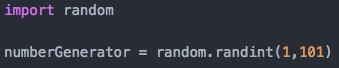
For this task I had to do a little research first on hoe to generate a random number with python. I found out that I had to use the ‘random’ module which contains many of random number generators.
So the first thing I had to do was to import the ‘random’ module and create a new variable which will hold the random number the computer will generate.
I used ‘random.randint(1,101)’ to generate a number from 1 – 100 and since the 100 had to be inclusive that is why I put (1,101)
The next step was to ask for the user for a number and convert it into a string, also since at the end of the program I put the total number of guesses the user tried I created a variable that will make the count for me.

I set the variable ‘count’ to be equal to 1 because when the program prompts the ‘Guess a number….’ message that will be the users first guess.
So the next step was the create a while loop and set the assignment to be that if the userNumber is not equal to numberGenerator it would loop through the following code:
- First I created an if statement and set the assignment to be that if userNumber is greater than numberGenerator it should print a message to the user and let him know that the number he chose is too low
- Then I created another if statement but this time I set the assignment to be that if userNumber is less than numberGenerator it would print a message to the user letting him know that the number he picked is too high
- Then below the two if statements I put a message so that the user can try again and input another
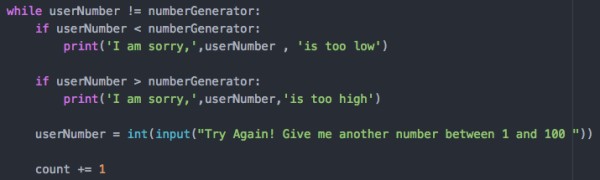



and set the new value of userNumber to change the previous userNumber
- Finally in order to keep count of how many tries the user has guessed I set the value of ‘count’ to be plus 1 every time the user guesses a new number
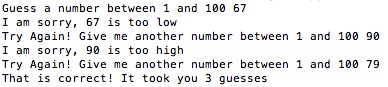
Finally if the user guesses the number I printed out a message letting him know that his guess is correct and it took him as many tries as the variable ‘count’ value is
This is how the final program looks like:
 #WSQ06 – Pick a Number by kevingmcc is licensed under a Creative Commons Attribution-ShareAlike 4.0 International License.
