TC2027

--Originally published at TC2027 – Surviving CS

This is the third class I took with Ken and I must say all classes have been such a different experience. This is the second class I took where is primarily focus on blogging and sharing my experience and this one is the one that I enjoyed the most maybe I lacked in my blogging skills but the topics I learned in class and the whole experience of learning by myself and digging into the internet was fulfilling.

TC2027 was focused on Informatic Security I learned from ransomware, vpn’s, cryptography, ssh, security from the user perspective, etc. Also, what I like was the slack group and all the resources my classmates shared this was also a huge important part of the class because from time to time I logged on the group and read the articles that they shared and I could learned about what was happening in the security world.

Overall the flip learning concept is great and its all about having an independent motivation to learn because we are free to learn as much as we want and immerse ourselves in a single topic or as many as we can handle.


Setting up SSH keys

--Originally published at TC2027 – Surviving CS

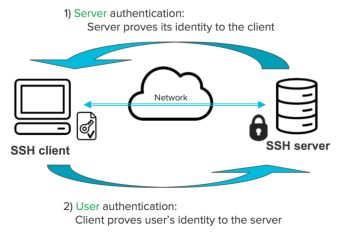
SSH keys are another type of security that you can use in order to authenticate yourself in a server. They are plane easier because you don’t have to remember a complex password.

Using a public key over a password provides some benefits:

  • Cryptographic strength that an overly complicated password can’t match.
  • Automate the process for sign-on.
  • No interactive login.
  • They check your identity via a private key.

The crypto keys use a private-public key schema, this way if someone is trying to perform a man in the middle attack it won’t work because the keys can’t be intercepted.

SSH keys works the following way:

  1. In order to access a server you need a key to access this information.
  2. Only those who can access the information can have an authorized key that will grant access to the server.
  3. The user who has permission to access the server will use his/her private key to unlock the server.
  4. Each authorized key has a corresponding private key that can unlock the server.

ssh-key-authentication-1441x970-6_knr0l6

Setting up an SSH keys

For this exercise I will be using Cloud9, Github and Heroku. The keys we are going to create will authenticate us and permit our virtual cloud9 computer to communicate with the Github servers. Then we will add those keys to Heroku in order to authenticate us when we perform a deploy to the server.

To create a key you need to type the following command in your working directory, this will create our key.

cat ~/.ssh/id_rsa.pub

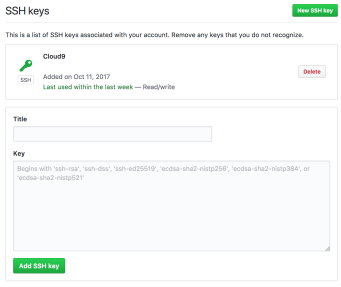
After the key is generate, copy that content to your clipboard and add it in the github settings.

Screen Shot 2017-10-25 at 3.39.18 PM

When this is done you can add those keys to Heroku

 heroku keys:add 

You will get a similar output

Screen Shot 2017-10-20 at 12.20.05 PM


Security on the web (User Perspective)

--Originally published at TC2027 – Surviving CS

On this post I’m going to focus on free wi-fi because any wireless network that can be accessed by anyone comes with any number of security risks.

The risks

You access a free wi-fi because it comes free, no authentication needed to establish a connection. This makes it desirable for for hackers because they can access any device that is connected to this free network.

One threat is known as the Evil Twin where the hacker position himself between you and the hotspot so instead of talking to the hotspot you create a connection with the hacker. The hacker can now monitor your activity and every bit of data you send is being received by the hacker instead of the hotspot.

Another popular threat is Man in the Middle where the hackers can hijack your connection and then redirect you to webpages that force you to install a software that contains a malware. This webpages are disguised as system updates or pop-ups that tell you that you just won a prize.

The solutions

What is the best way to protect yourself against this type of threats?. Some of this security tips can get you started:

  • Don’t use public wi-fi to access financial institutions, shops or other sites ever.
  • Implement two-factor authentication in any website that has it or where you have sensitive data, so if your password gets stolen they won’t be able to log in because they need another piece of code to access your data.
  • Use a VPN (virtual private network) to encrypt your data and create a network within a network.
  • Keep wi-fi off when you don’t need it or turn off the automatic wi-fi connection so your device can’t connect automatically to hotspots.
  • Only visit sites that are secure with HTTPS.


net20security20fpga


The Cuckoo’s egg

--Originally published at TC2027 – Surviving CS

Today I’m going to talk about a book, is not a hard topic but I found it interesting because it’s about a hacker, security and passwords.

The Cuckoo’s Egg is a tale of computer hacking and espionage, the author was an astronomer at Lawrence Berkeley Lab, suddenly the money for his department ran out and he had a choice to develop programs for those astronomers who still had grant money or unemployment.

The choice was clear, he started developing a program to keep track of computer usage and almost immediately he discovered a 75 cents error that was assigned to a user who didn’t have a valid address. The real problem was here, the computer at Berkeley were networked to other military and scientific computers. His investigation drew him into a rabbit hole, he involved a lot of three-letter agencies and he had to deal with a lot of bureaucracies.

The threat was real because the hacker could access to sensitive information that could threaten the national security in the USA. Despite that this was published around the early 90’s, the damage a hacker can do and the need for MORE secure passwords is valid today as it was back then.

Probably we don’t have military or scientific secrets but we do have private information that we wouldn’t want compromised. So this tale stands valid today and I can bet it will be valid in the future.


Sending an encrypted message

--Originally published at TC2027 – Surviving CS

For this tool we are going to use Keybase.io.

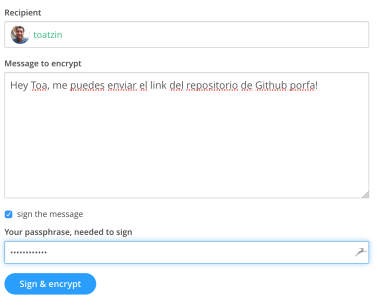
Keybase let us encrypt and decrypt a message an sent it to other keybase users. I plan to sent a message to my friend Toatzin.

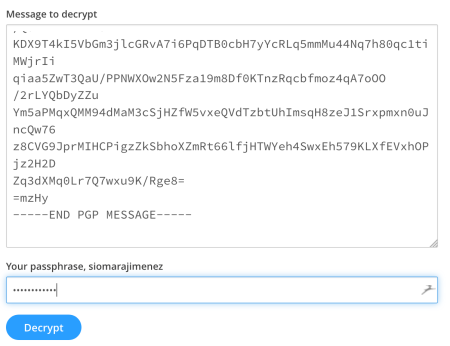
Screen Shot 2017-10-12 at 6.55.34 PM

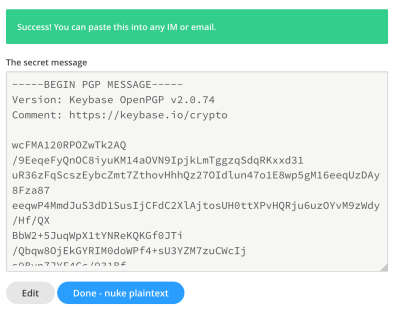
To encrypt the message I only need to sign it and then write my passphrase in order to complete the encryption. Once the encryption is done, the program will provide me with a plain text that I can paste and email to Toa.

Screen Shot 2017-10-12 at 6.58.39 PM

Once is done I can email it to him and he can decrypt it, the reliable thing about signing our emails is that  if someone hacks his email they can’t read it because it has a bunch of random letters and numbers.

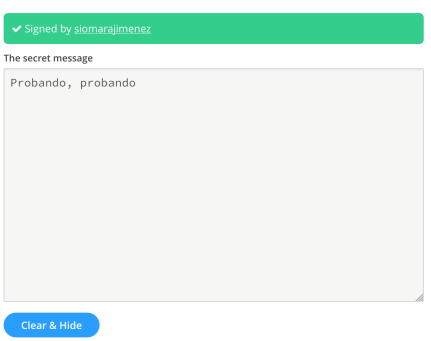
Similarly decryption works the same, you receive your signed message and paste it in the decryption box and write your passphrase.

Screen Shot 2017-10-12 at 7.08.54 PM

If you are the recipient of the email you can decrypt the message.

Screen Shot 2017-10-12 at 7.09.46 PM.png


Encryption 101

--Originally published at TC2027 – Surviving CS

What is encryption?

Encryption enhances the security of messages or files because only those who have the right key can open the message and read it. This type of security dates back a long time from Julius Caesar to the Nazis, the need to hide or protect our information to stop people other than its intended recipient from reading it.

So to start encrypting a message you need a key to start an encryption and also you need a key to decrypt the message. If someone is listening and hijacks the message  he/she can’t read it because they don’t have the proper keys to unlock the message.

There are two methods to encrypt data:

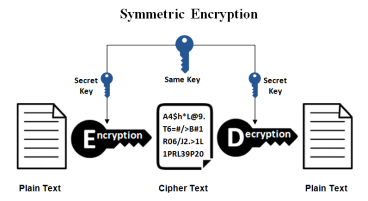
  • Symmetrical encryption – In this type of encryption both the sender and the receiver need to have the same key in order to make an encryption or decryption.

symmetric-encryption

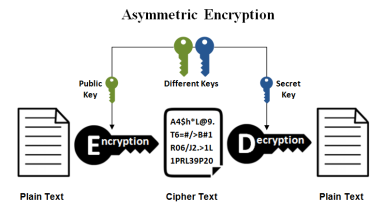
  • Asymmetrical encryption – In this type of encryption has two keys one public and one private, they public key is available to anyone who wants to send you a message but the private key only the receiver has it, this way only the owner of that private key can decrypt the message.

asymmetric-encryption


Source:

https://www.ssl2buy.com/wiki/symmetric-vs-asymmetric-encryption-what-are-differences


Is it really important to acknowledge computer security?

--Originally published at TC2027 – Surviving CS

We hear it almost every day: a new company has its security breached and tons of data is stolen, the result is irreversible because millions of dollars are lost and trust is now broken. Computer security goes from Equifax hack making millions of peoples anxious, a celebrity photos/videos leaks or your computer is kidnapped by some nasty hacker who demands money in order to give you back all your data!

I show these three examples because these are the risk of dealing with a digital culture; this may sound terrifying but protecting yourself and start learning how to secure your data is important. So yes, these three attacks also show how vulnerable we all are: a huge credit company like Equifax, a Hollywood celebrity or your workplace is not exempt of someone trying to steal your information.

So how these attacks could be avoided?

  1. Equifax – This one is kinda tricky because from what I read about the hack there was a vulnerability in a framework that they used and it wasn’t patched this allowed a hacker to exploit this in order to gain access to the servers. So the main reason was that they didn’t stay updated with their software.
  2. Celebrity hack  or anyone – So all your private photos were stolen and publish online or someone guessed your Facebook password and now is posting embarrassing status about you. These one is so simply to avoid: create longer and hard to remember passwords, you don’t even have to remember them: use a password manager – my personal favorite is Dashlane.
  3. My computer is kidnapped now what? – You probably heard of WannyCry ransomware that literally made cry 230,000 computers over 150 countries, this crypto-worm infects computers and propagates through intranet or even the internet, it crypts all your data
    Continue reading "Is it really important to acknowledge computer security?" →