Importing and using modules/libraries

--Originally published at Python

Importing helps you use libraries or modules already available in Python 3. This means you don’t have to create functions from scratch, instead you can use the ones that already exist to save time and effort. There are a lot of libraries you can import, each has specific functions, in this blog, I will only focus in the import Math.

Code:

import math

print(math.fabs(-8))
print(math.ceil(1.1))
print(math.factorial(4))

2import

As you can see, the first thing you need to do is import the module/library, then you have to call it with a variable. For example, I used “math.fabs” which returns the absolute value of a number. So as a variable I used -8 and the program returned 8. There are 2 more examples below, but there are way more libraries you could use. If you want to learn more about them, check this link. It has all the functions you can use, as well as other modules/libraries.


ARE YOU A LIBRARY MOUSE?

--Originally published at Coding The Future

Image by Dmitrij Paskevic

Hello everyone! Guess what? Partials are over! That means that today we're back on track... And today's topic is libraries, a.k.a. modules in Python.

Let's begin by defining modules. TutorialsPoint defines a module as a logical way to "organize your Python code. Grouping related code into a module makes the code easier to understand and use".1 In short, a module is a separate file where you define functions related to a specific action and then import it to your code. The best thing about it all is that it makes coding less confusing and functions re-usable across several programs!

Let's get started!

Creating a module

Creating a module is easy. All you have to do is create a new Python file and define the functions that will belong to that module.2 For example, if you wanted to create a module containing all the functions for Tic Tac Toe, you would create a module named tictactoe and define all the functions inside.

Using a module

Once you wanted to use the library you just created or downloaded from the internet, the first step would be to import it. In the file where you will use it, type the word import followed by the name of the module. Let's say we wanted to import the tictactoe.py module we imaginarily created above:

import tictactoe

That imports the module, but in order to use the functions inside it, you need to call the function by using the name of the module (dot) name of the function. Let's say I wanted to use the newGame function within the tictactoe module:

tictactoe.newGame()

That's it for today... I know, that was easy! Happy Mexican Independence Day! ??

@emamex98

--

FOR ALL THOSE PROCRASTINATORS

--Originally published at Coding The Future

If you are reading this right now, you were probably procrastinating, and just started studying for tomorrow's test, right?

Well, as always, I've got you covered. Here's a quick video summary of what you need to know for the first partial. I hope things are not too strange.

Good luck!

I think I do not get modules

--Originally published at Monty Python and the Blogging Tale

I need to import them so I can do some stuff that python alone cannot do. They seem like a cool thing to have around, but there are so many of them that I do not even now which one to use; I have to be mainstream and use the math one. I mean, in javascript I did not even know I was using modules, and now I have to specify which one I am using. I know how to import them and all that stuff, but I think I need to get my favorites, or else I will not like any of them; did that make sense? I think not, but you get me. I am a desperate student who is pressured by the exams. Anyway, here is my code:modulesI just printed system32. And I am very happy.


Modules and libraries

--Originally published at Py(t)hon

This time we are going to see the Modules or Libraries what are those things, in simple terms they are Python files that contain definitions and statements, this ones can be imported or well created by yourself.

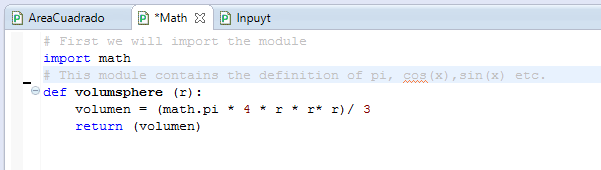
To import one of this modules and use it in your program is very easy, you just type “import” follow by the name of the python file (without the suffix .py). Then when you are going to use it for pi or cos(x) you have to first type the name of the module, then the pi or the cos(x). Here is an example:

modules 1

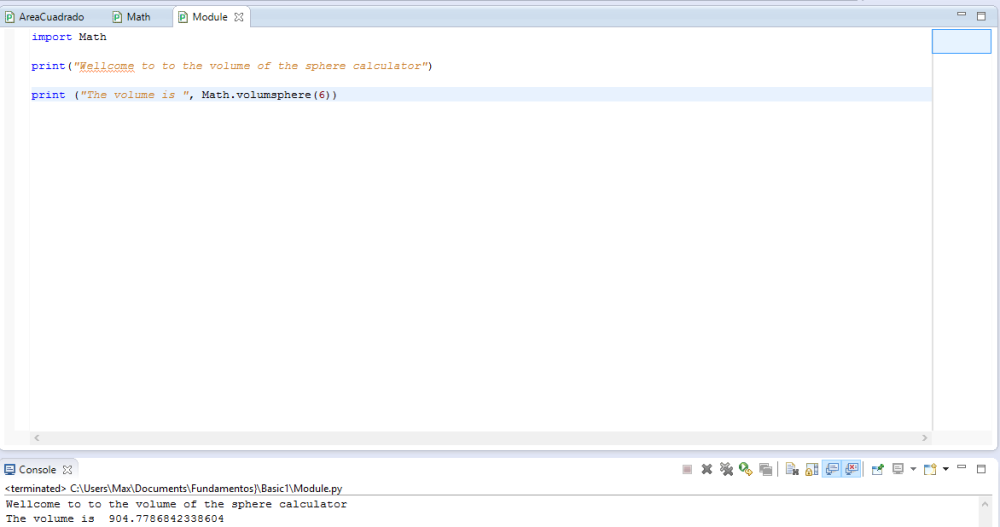
With the previous function we did with the help of the module math, we are going to use it as a module:

modules2

That’s the basic of modules and libraries, see you next time. Here i leave you a youtube tutorial maybe you understand it better with this video. #Pug#Python#Modules#Libraries#Tc101